

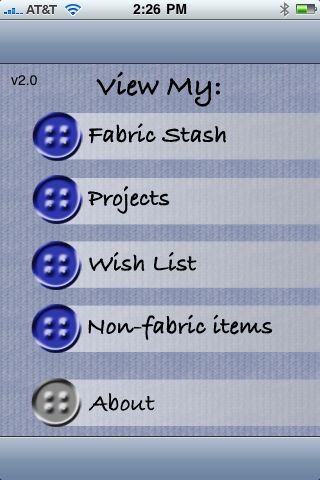
Projects, notions, and access to your fabric stash, are all available on your iPod touch, iPhone or a new iPad.
If you have an iPhone, iPad or iPod touch, you’re already familiar with apps, useful or fun programs you can purchase inexpensively through iTunes.
Some of my favorite apps are StitchMinder by Quilt2Go, which I use to track knitting patterns; Units by The Mac Box, which converts all kinds of measurements (length, temperature, volume, currency, etc.) and Dictionary!, which is a lot handier than lugging around an actual dictionary.
I recently came across FabricStash by Blueshift, a $4.99 app that has the potential to be a great tool for sewers. As the advertising for the app says – “it’s like having your entire fabric stash in the palm of your hand.”
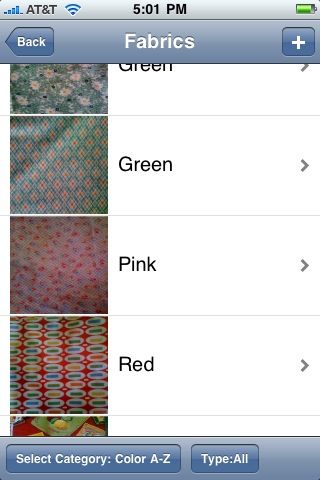
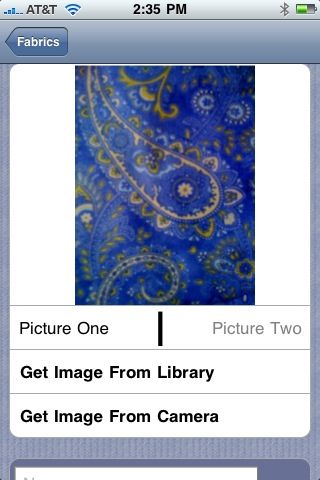
FabricStash allows you to create a record – with up to two photos per fabric – of the material you have on hand. You categorize your stash by features you select or enter yourself, such as color, fabric type, yardage, etc., or other characteristics. It’s designed to be customizable.
It also tracks notions, so you see at a glance what buttons, thread, ribbons, etc. you have.
You can group fabrics and notions into a “project.” If you are, for example, shopping for materials to make a quilt, you can see at a glance the fabrics you have already and in which colors.
Working on a garment, say a lined jacket? Look and see that you have the lining, but need tailor’s canvas, buttons, and thread perhaps.
I’m anticipating a lot of uses for FabricStash. No more lists! Now more digging through my purse for the fabric samples I forgot to bring with me. And hopefully no more duplicate purchases, when I realize I did already buy the buttons, thread, or zipper I needed to finish a design. There is also a wish list section, where you can note what you need when new designs occur to you, and a FabricStashXL version for the iPad.
I enjoy gadgets and like to get the most out of my iPod, but for years I kept track of fabrics with swatches on 3 by 5 cards in recipe filing boxes. How do you track your stash – electronically or otherwise? Please share! I think – and I believe a lot of Threads readers will agree with me on this – that a good fabric-tracking system is a basis for getting more time to sew!









I'm almost a luddite when it comes to this kind of technology--I've seen too any tweens and teens doing nothing but tapping the surface of tiny electronic gizmos that I can hardly even see. However, this application goes a long way toward making sense of the iPod, iTouch, or even the iPad.
So here's a question from a complete tyro: do all these iWhatevers have built-in cameras, so you can instantly shoot and load photos of your fabric? Or do you have to use a separate camera and upload the digital photos from there?
My current system of stash-tracking involves many plastic storage bins, baggies of swatches, a certain amount of elbow-grease, and my memory. There must be a better way, and this iPod app might be it!
ERRRRRRRRRRRR............
I've been sewing nearly 30 years my stash would take me months to catalogue and photo!!!!!!!!!!!
I have to rely on memory to find a remembered treasure. Which room? which cupboard? which box? Mostly I just go out and get more stuff because I can't find the fabrics in my stash.
Have made some feeble efforts to sell bits on e.bay. Sometimes instantly thinking of something I could of made from that precious item, now gone forever.
Dear Sarah,
I did try to find some apps like these before for my iphone but failed. I got iConvert and iDictionary already. Love high technology. The fabricstash is amazing. There are so many pieces of fabrics I bought long time ago that I could not remember what types, how much I had, sale prices... but right now I have my fabrics sorted by colors and seasons. My stash now is full of 4 2-door storages :)... Well, now I know what I have, whenever I stop by Fabric stores I can take a look at my stash and could find the best piece to match to each other.
This is Great idea and Bravo to high-techno!!!
Thanks for sharing this.
I can't find an app like this for my android phone :( but I did use my phone last week to take a picture of the bolt end of some fabric I bought. Now at least I have the fiber content, care instructions, and fabric name in case I ever want more. Now I'm more motivated to somehow electronically organize future additions to my stash.
I just got an app from this same developer, I think, called Pattern Pal. I can enter every pattern in my stash (which is in competition with my fabric stash for most space occupied in my sewing room) - fabric yardage needed, notions, etc. It might be dangerously enabling when I'm at the fabric store looking at beautiful fabric and wondering "what could I make with this?"
The iPhone does, not sure about the other devices. Although I suspect that it will take a while to actually catalog my stash, I think this app will help me out -- luckily I got rid of quite a bit of my costume fabric stash recently by donating it to a youth theatre company. But I still have a LOT! I have 4 unique types of stash to "maintain": my fashion fabrics, costume fabrics -- mostly lycras and sparkly stuff for skating costumes, quilting fabric and home dec fabrics. So many fabrics, so little time!
OK I am only partially techno savy. I would love a program like this since my accounting software does not have a place for me to track my stash. I don't suppose this " I " program would work on a regular computer or laptop?
Until now I have been cataloging my fabrics using 1) post-its with a snippet of the fabric on it with content, and the project I wish to make stuck to the back of my sewing room door and 2) via photos taken and put into a Word.doc document ... that word doc didn't get very far as I am with others - having so much fabric it would take months.
I do have the iphone and this app seems very useful BUT I hate that the image(s) must be in a separate folder uploaded by connecting to itunes OR in the general 'photos' app. The iphone does have a built in camera (someone asked) I can see it would be beneficial to have the (2nd) image of the end of the bolt with all the info readily available.
How do you input the data? Do you have to use the iPhone/iPod or is there a desktop component? I have a serious stash that I've been putting into a database I created, and I can't see getting that info into my iPod Touch using a little virtual keyboard.
Hello! I want to thank you all for reading my post about the FabricStash app - and to answer as many of your questions as I can. Here are some that have come up:
SkyMom asked if the iPod Touch or the iPad have a camera. Currently, of the three devices (iPhone, Touch, and iPad), only the iPhone has a camera (there is speculation on the Internet that Steve Jobs has a unique iPad with a camera... but he's the head of Apple!). If you have an iPod Touch (as I do) or an iPad, you will have to take photos with a digital camera, save them in iTunes and in FabricStash, draw your stash images from the Photos app.
FabricStash allows you to have two photos for each fabric - Loscoz had an excellent suggestion, to take a photo of the end of the fabric bolt - nabbing the fiber content, width, etc., with a snapshot.
Lou19 said it would take her months to catalogue and photograph her stash. I hear you! I always think of organization as, well, a path of least resistance activity. It's wonderful to be organized as long as it doesn't cause more effort than looking for something! I'll tell you, I have gradually been cataloging my older fabric. FabricStash has been most useful as a tool when shopping - because it's all right there - so mine contains mostly recent purchases so far.
NancyinA2 asked if it were possible to input the data about your fabric on your desktop or laptop to avoid using the tiny iPod "keypad" (if you can call it that). No, unfortunately, not that I am aware of. I know others have mentioned Word documents with imbedded photos as a desktop solution for tracking a fabric stash. I am going to do some research and see if I can find a good desktop utility to track fabric. Please let me know if you have any to recommend!
After reading this story, I purchased this app and I was surprised how good the pictures of my fabric came out. It was easy. I pushed the + button in the Fabric Stash program and could choose the camera on my i-phone. I was pleased that the fabric picture looked like my fabric. Very fast and easy to use. There is room for 2 pictures for each fabric.
SewNana
http://www.sewnana.com
We have a binder that we have taped/stapled little swatches into the pages, three or four to a page, with yardage and fiber content/type. It's pretty good, you just have to keep up with it. Which . .sometimes easier said than done.
@Skymom;
Yes, all new model iPhones have built-in cameras.
The current edition iPad doesn't (expect to see it on future editions)
Question to everyone else: What features would you want to see added? I'm a long time home sewing enthusiast currently back at school for computer science and will be taking an mobile device development class in the fall.
From my own print/design industry experience, I can see wanting to create something that could also handle die and pigment lot info so as to be able to cross-reference colour matches from different suppliers, a yardage converter/calculator and possible a fabric type reference database.
Thoughts?
Another feature I have not seen mentioned, is the Wish List can be enhanced by using the built in camera when searching the web. This is really handy. You can bookmark your phone or Ipod... Or you can add it to your wish list by simply pressing the home screen button and the power up button at the same rime. This will take a picture of your screen. You can pinch open or close for the size of shot you want. Now I am off to search......:)
Also, in response to Smcfarland and NancyinA2, regarding the ability to enter the data into Fabricstash via a desktop. You can. Here is how.
Use a data base or spreadsheet program. Format the entries to match those on the app. Sounds hard but it is easy. Next enter what ever you wish to fill the information. Email this to yourself. Copy and paste the email in Fabricstash (in the corresponding catagory). Done. I have done it. It works. It is far easier though to use the typepad on the phone. Good luck.
I love this app.
I was just starting to take pics of my fabric & realized that I wanted more than just the pic on my iPod.
Does anyone know if this app works on the iPod - no camera!
Thanks!
This is for Julia, Juliasew, there may be a bit of confusion here as the iPod Touch is the iPod refered to in the article about the app. The app can not work on other iPods. It must be a iPhone or iPod Touch. The upas has no camera yet, so it must have pictures emailed or synced to it from iTunes or other picture programs. I hope this helps.
Fashioflower :)
Delighted to find this article. Six months later, I am searching for apps for iPhone and iPad that work for sewing, needlework, and embellishment.
Good news is that Judith Montano has several embellishment apps out with drawings and videos of stitches. There's a free download that gives you a feel for how the paid apps work.
Bad news is that the Fabric Stash and Pattern Pal apps can lose all your information if you have to replace your iPhone. (It's supposed to be restored from your computer but this does not always work, as I learned the hard way.)
So if you are storing any info on your iPad or iPhone, be sure there is a way to back it up somewhere other than your iTunes. Some products do this when you register them. The latest rev of Fabric Stash has this option but Pattern Pal does not yet.